
RZip
Originally, I worried that the whole project would be less interesting if you could easily view the code and figure out everything that's in there. I decided to somewhat obfuscate all the large text assets by compressing them using a custom algorithm. This compression algorithm had a few requirements:
- Should be easy to implement - this is a spare-time project after all.
- Okay compression ratio for what it is.
- Output should be entirely in the printable range, since that's more fun to look at in the output.
Algorithm
The following is what I came up with, and called "rzip".
Control character selection
First things first, the whole text body is scanned, and the least common printable character is selected. If there's a tie, one of the least common characters is picked randomly. The chosen control character is printed at the beginning of the compressed section twice. (I'll explain why it's needed twice later.)Lookback replacements
Next, we scan through the text, looking for things to replace. Every replacement will start with the previously selected control character. There are several things that could follow the control character though:_will produce a newline. This is we can guarantee that all newlines in the text become a control character combo, reducing the literal newlines present in the source file, for aesthetic reasons.-will produce the control character. This is so we can always pick a control character, even if the source text contains at least one of every printable character.<#><#><#>where<#>is a base-36 integer. In this case, the first 2 numbers are used together to get anoffset, and the last integer is used to get alength. We will scroll backoffset + 1chars in the text, and will copy overlengthchars.
We'll make one pass through the text, replacing whatever we find. Newlines and control characters are all replaced as we encounter them, but the copy pattern will only kick in if we can find a repeating blurb of text longer than 4 chars. (Since the replacement sequence is 4 chars long, we don't want to perform any replacements that increase size, especially since the other 2 replacements already are...)
Replace common pairs
After that first compression pass, I realized that most docs still had a whole bunch of printable characters at the end that had never been used. So, let's use them! We'll select a random unused printable character as a control character, and then look for the most common 2 character sequences in the text. If we do the replacement, we'll prefix the compressed text with<ctrl><2 chars>, so the cost of this replacement is 3 chars, and each match will get us 1 byte back. We only want to do the replacement IF we can save some space with it, so we'll only consider 2-char sequences that occur 4 or more times. We keep doing this replacement until:a. We run out of unused printable characters, or b. We run out of 2 char sequences that occur 4 or more times.
Also, this is why the control character in the "Lookback replacements" section is printed twice - since a common-pair replacement's control character is something that was never in the text, we KNOW that the same character twice in a row would never occur naturally in that header. So during decompression, we'll keep doing the expansion phase until the first 2 characters in the text are the same. THEN we can continue to loopback replacement.
Results
When run on all the text assets in the project, we get the following results. (I also decided to run the same assets through gzip compression with default settings, because THAT'S surely a fair comparison. /s)
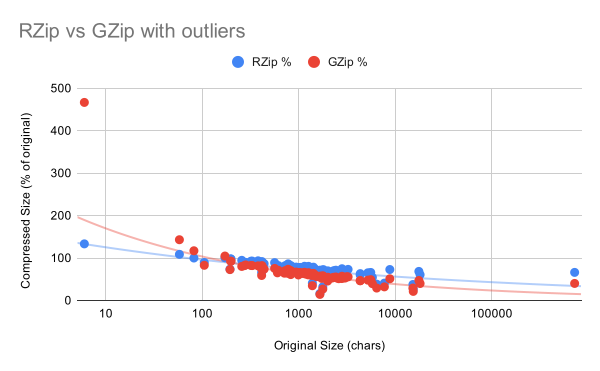
There are a couple of notable outliers there:
- One is the "/etc/hostname" file, where it is only a few characters long, and so compression doesn't really help. GZip fares much worse in this case. RZip does better, since the header is only 2 characters.
- The other notable outlier is the Apollo11 transcript stored at "/usr/share/apollo11/mission.dat". This file is ~708 KiB, which is significantly larger than any other asset. RZip compresses the file to ~66% of the original size, whereas GZip gets the file size all the way down to ~40% of the original.
With those 2 outliers trimmed, we get:
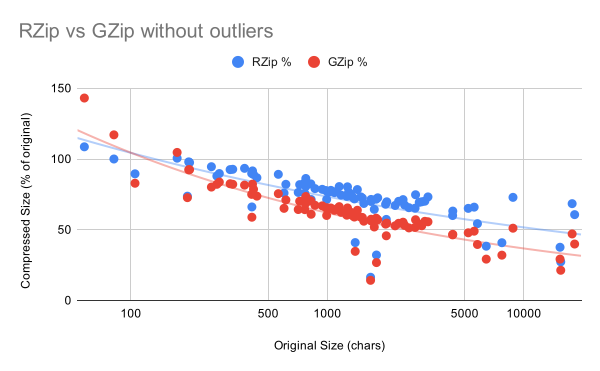
So obviously, gzip does better. The decision to keep all control characters in the printable ASCII range, while also converting every 1 character newline into a 2 character escape sequence for purely aesthetic reasons is probably eating into compression ratio quite a bit. All that being said, RZip is not bad, I was actually surprised to see how well it performed. (At least in terms of compression ratio, actual compression speed is quite slow, owing to how unsophisticated the implementation is...)