
Orrery
I love Orreries - there's something calming in the way all our planets slowly dance about the sun. I was previously working on some other Orrery project, but I put that project on hold. I got as far as supporting all the Keplerian parameters (a, e, I, L, ϖ, and Ω) for all the Planets + Dwarf Planets, all of their moons, and also a bunch of known asteroids and comets. That project was also doing the VSOP87 calculations to simulate the Sun's location about the Solar System Barycenter, but I ended up getting too deep in the weeds of other parts of the model's implementation. (My breaking point was trying to get the simulation of the Earth-Moon system to be accurate, but those models get complex and I was already kinda burned-out after trying to extract usable Keplerian params from JPL's Horizons Ephemerides service...)
Anyways, I ported some of that project's code into Toast OS, and switched up the rendering to write to stdout with ANSI sequences. Honestly, I kinda like the ANSI version more than the three.js stuff I was doing previously.
Keplerian orbits
A reasonable approximation for orbits is a Kepler Orbit, where the shape of the orbital ellipse is defined by 6 parameters. Strangely enough, WHICH 6 parameters get used actually changes based on context, but they all describe the same basic elliptical shape, and the parameters themselves can usually be easily converted between each other. For this orrery, I chose to base everything on the params typically used for major bodies. I'll describe those in a bit, but first, let's define a few terms about Orbits.
Orbital Characteristics
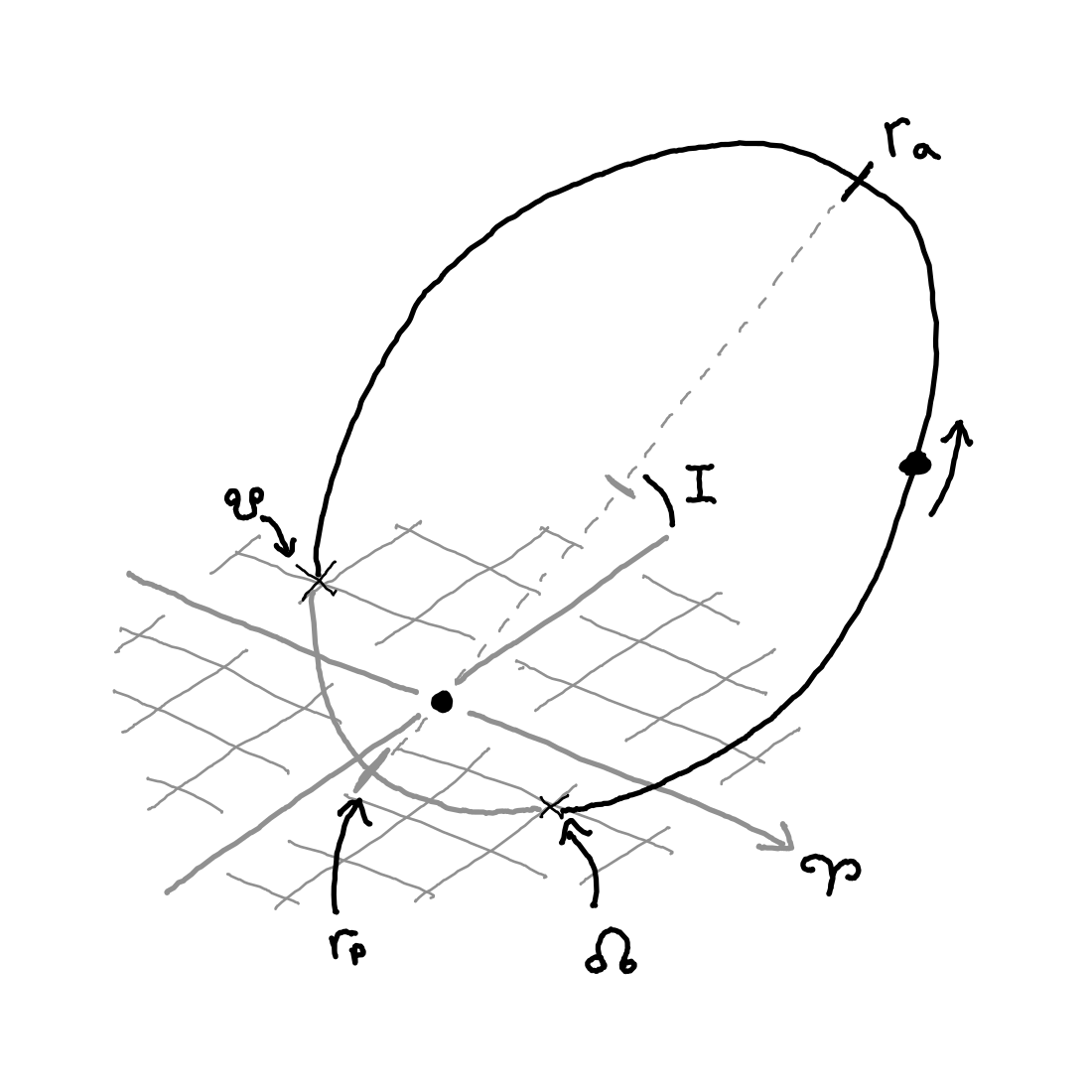
Orbits will take the shape of an ellipse, and are placed within their own Orbital Plane. These orbits are defined relative to some other plane, called the Reference Plane. For the Solar System's Planets, the reference plane is usually the "Ecliptic Plane", which aligns roughly with Earth's orbit. The Reference Plane will always have some Reference Direction defined (𝚼 in the diagram) which is used as the 0° angle for some of the other parameters. These two planes will then have some angle between them, which is the Inclination or
in the diagram. Also, the Orbiting Object is assumed to be traveling in a counter-clockwise direction, and so the angle that points at the object is always increasing. If the Object is orbiting the other way (called a retrograde orbit) then the Inclination is simply increased to something above 90°, which flips the orbit around so the angle can be "increasing" as far as the math is concerned.When these 2 different planes intersect they form a single line. The orbit's center object will sit along this line, and the orbiting object will travel through this line at 2 points - one point where the Object is going up, and another point where the Object is going down. The going-up point is called the Ascending Node (☊) and the going-down point is called the Descending Node. (☋) Also, there are 2 critical points on the Orbit itself: The furthest point from the center object is the Apoapsis or
, and the closest point to the center object is the Periapsis or .Suffix for Apoapsis and Periapsis
The -apsis suffix is pretty general - it can be used for different types of orbits. However, the suffix can be swapped out based on the center object. For example, Satellites orbiting Earth are often described as having an Apogee and a Perigee, to emphasize that they're orbiting Earth. And Planets / Asteroids orbiting the Sun will have an Aphelion and a Perihelion. And sometimes, the parameters are called Apocenter and Pericenter, and some of the JPL's APIs will occasionally use the term Perifocus for some angles. Yay, confusing nomenclature!
Anyways, with all those things defined, let's talk about those 6 Keplerian Parameters:
Orbital Parameters
a (Semi-Major Axis):
This is the distance between the Apoapsis and Periapsis, divided by 2. Why divide by 2? Because the divided-by-2 version works better for the math.e (Eccentricity):
This is a coefficient that indicates how "eccentric" the orbit is. 0 gives a circular orbit. 0.9999 would have a super squished and narrow orbit. For it to be a normal orbit, the number must be under 1. Mathematically, this number describes where the orbit's center object is between the center and periapsis.I (Inclination):
This is the angle between the Reference and Orbital Planes.L (Mean Longitude):
The Mean Longitude is the Mean Anomaly (M) added to the ϖ (Longitude of Periapsis). So what is the Mean Anomaly?Just for a moment, let's pretend that eccentricity were 0. This would make the Orbit perfectly circular, and would mean the orbital body would rotate about the center at a constant rate, which is called the Mean Motion (n) and is usually given in degrees/day. The time to complete an orbit would remain the same.
Even though no orbit is perfectly circular in reality, we still consider this perfectly circular orbit, and then use math to correlate positions on the Mean Orbit to positions on the actual orbit. This is far easier than calculating the motion of the body using gravity, velocity, and physics. The position of the orbiting body on this perfect orbit is the Mean Anomaly (M), and it is the number of degrees between the Periapsis and the orbiting body.
ϖ (Longitude of Periapsis):
This is an angle equal to the Longitude of Ascending Node (Ω, see below) added to the Argument of Periapsis (ω), where the Argument of Periapsis is the angle on the Orbital Plane between the Ascending Node and the Orbit's Periapsis. Why are we adding an angle on the Reference Plane to an Angle in the Orbital Plane. Indeed, the ϖ value doesn't really describe anything physical, it's just a useful parameter when performing calculations.Ω (Longitude of Ascending Node):
This is the angle on the Reference Plane between the reference direction and the Ascending Node of the Orbital Plane.
Note on compound parameters
Several of those parameters (L and ϖ) are the sums of several different angles within different orbital planes. So, what gives? Well, those numbers aren't really meant to describe any physical characteristics of the orbit, they're just useful parameters in the orbital math. If you want a set of parameters that simply describe the shape of the orbit, the Mean Anomaly (M) and the Argument of Periapsis (ω) would probably fit the bill better.
Those six parameters together uniquely define an ideal orbit, and will place the orbiting body at a specific place ON said orbit. However, how do we determine motion? For that, we'll use an Epoch, and rate parameters.
The Epoch is a specific point in time where all 6 of those parameters were equal to the given values. The Epoch is almost always given as a Julian Date, which is the number of fractional days since January 1, 4713 BCE, in UTC. Most of the planets use J2000, or 12 noon on 2000-01-01.
Rate parameters describe how much change in some of the values is expected given a certain amount of time. Typically, a rate value for L is all that's required, since that'll move the orbiting body along the orbit. However, rate parameters can be given for any of the above parameters, if the shape or orientation of the orbit is expected to shift over time.
Calculating the position
First up, all the planetary parameters are defined using the Longitude of Periapsis (ϖ), but we do also want the Argument of Periapsis (ω). That's easy:
Next up, we'll also need the Mean Anomaly (M), not the Mean Longitude (L). That's also easy:
With those two values on-hand, we'll now use Kepler's equation to solve for the Eccentric Anomaly (E), which is the actual angle pointing to where the Orbiting Object is in the actual orbit.
The problem with this formula is that there is no clean way to solve for E. Even Kepler believed such a solution to be impossible, saying:
"I am sufficiently satisfied that it [Kepler's equation] cannot be solved a priori, on account of the different nature of the arc and the sine. But if I am mistaken, and any one shall point out the way to me, he will be in my eyes the great Apollonius." - Johannes Kepler
So yeah, we just use Newton's method, and get close enough.
With the E angle on-hand, we can plug those into the formula for an ellipse to get the actual X, Y coordinates for an item in the Orbital plane.
After that, we have the X, Y coordinates on the Orbital Plane. Now we just have to rotate that point back onto the Ecliptic by rotating -ω degrees about the z axis, then -I degrees about the x, and then finally -Ω degrees about the z-axis again.
Objects included
First up, is the Sun. I simply locked the Sun at (0, 0). Yes, the Sun is actually in motion, rotating around the Solar System Barycenter in a complex dance, but calculating that position involves bringing large tables into the codebase, and I didn't want to do that given that the display resolution would never show any of that movement anyways.
Next up, all the main sequence planets. I got their parameters from JPL's document about approximate positions of the planets. This page is also where I got many of the formulas for Keplerian orbits. A few notes, however:
The doc claims
is the post-2006 IAU Barycentric Dynamical Timescale, JDTDB, but all the formulas seem to indicate standard Julian dates. Specifically, the Epoch would be wrong if I did all the JDTDB adjusting.That page has a few typos. It claims that e is in degrees, but e is a coefficient, and so is unit-less. Ignore the bit where they talk about converting it from radians to degrees, it was never in either. This also changes the formula for
when solving for E using Newton's method, since it used to claim that we needed e in degrees in the numerator, but radians in the denominator. Just do:There was another section that claimed that Jupiter and beyond needed a few extra params (b, c, f, and s) and that
should be added to M when performing calculations. I couldn't find any orrery that did that, and even JPL's orbit viewer seems to omit that step.
For the Dwarf planets (Ceres, Pluto, Eris, Makemake, and Haumea) I drew from the JPL's small-body database. I had to tweak the data a bit to make it work with the rest of the system, since I didn't want to have to support different types of input parameters, or different Epochs:
- The DB gives Argument of Perihelion (ω). I converted these to ϖ by adding the Ω values to them.
- The DB also provides Mean Anomaly (M) values instead of the Mean Longitude (L) values the formulas want. I converted them by adding the ϖ value calculated above to the M value provided.
- All the planetary parameters use the J2000 epoch, but the small body database uses a different epoch for each small body. I converted them all to J2000 by calculating the number of days between the small-body epoch and J2000, and then multiplying that by the Mean Motion (n) and then subtracting that result from L.
Rendering the system
Now that we have the ability to calculate the coordinates of an object in the ecliptic plane, and have the parameters for a whole bunch of interesting objects, it's now time to draw those objects on the screen.
The first issue that comes up, is scale. Mercury is an average 0.4 AU from the Sun, so its X and Y coordinates will vary from -0.4 to +0.4. Neptune is an average 30 AU from the Sun. Given the wide range of coordinates, it'd be VERY difficult to differentiate between objects if we simply drew them on a 24x80 character display. To help with this, the default view will scale the coordinates logarithmically. Note that the logarithmic scaling is performed on the distance of the object from the Sun, and not to the coordinates directly, as that would deeply mess with the angles.
In addition, I made sure that only the Sun + the planets were selectable, leaving the Dwarf Planets moving about silently in the background. I thought that kept them from becoming too distracting, and kind-of turned them into a fun easter egg. 😃
Beyond that, the process for rendering is pretty straight-forward: Iterate the list of tracked objects, calculate their positions, and write the ANSI sequence to move to that XY pixel in the display, and write out the object's representation. The one trick I use is to gather all strings together, and flush them to STDOUT at the same time. This is so the size of the string can be audited, since I want to make sure that the total command size is under 4 KiB. (Pipes in Toast OS will break up large payloads into chunks of 4 KiB. The message getting chunked could then cause visual tearing when rendered.)